File: /home/wbwebdes/domains/survey.wb-webdesign.com/private_html/modules/admin/globalsettings/README.md
# GlobalSettings admin module for LimeSurvey
## Quick introduction
Comming with LS4, it's now possible for 3rd party developpers to extends LimeSurvey controllers, and to override their views and subviews.
Here a very small example to show how to proceed.
## Directories, namespace and class name
### The core file name determines the directory name
You can extend any of the controller in the admin directory:
https://github.com/LimeSurvey/LimeSurvey/tree/85cc7c52479addbffb6a857ddc7aa10f52b0b02c/application/controllers/admin
For this example, we choose to extend GlobalSettings controller:
https://github.com/LimeSurvey/LimeSurvey/blob/85cc7c52479addbffb6a857ddc7aa10f52b0b02c/application/controllers/admin/globalsettings.php
Since the name of the file is **globalsettings.php**, we must create a directory **modules/admin/globalsettings/**. Respecting case of original file is important.
Note that LimeSurvey files are not normalized (sometime upper case, sometime lower case, sometime using dash, sometime camel cased, etc ). If we have time, we'll normalize the names before we release LS 4.0.0.
Then, inside **modules/admin/globalsettings/controller/** we create a file with the exact same name as the core file: **globalsettings.php**
### The directory path determines the name space
LimeSurvey is based on yii1, and yii1 doesn't really use name space, but rather aliases for path. This is for historical reasons: PHP prior to 5.3.0 does not support namespace intrinsically. So yii1 rather uses a prefix for all their core classes, and uses path aliases extensively. But, for those who want to use namespace, all the Yii import methods accepts path, alias, or namespace. So ideally, in yii1, it must be possible to easely translate your namespace to aliase so we can easely translate your namespace to aliases. To be clear:
So first, in **modules/admin/globalsettings/controller/globalsettings.php** we define a namespace:
```php
namespace lsadminmodules\globalsettings\controller;
```
lsadminmodules is the Yii alias for the directory **modules/admin/**. Then **lsadminmodules\globalsettings\controller** is the namespace attached to the path **modules/admin/globalsettings/controller/**, which is indeed the path of our controller so everything is fine :)
To learn more about the relations between path, aliases and namespace in yii1:
https://www.yiiframework.com/doc/guide/1.1/en/basics.namespace
To see examples why we need to convert your name space to aliases:
https://github.com/LimeSurvey/LimeSurvey/blob/85cc7c52479addbffb6a857ddc7aa10f52b0b02c/application/controllers/AdminController.php#L176-L179
https://github.com/LimeSurvey/LimeSurvey/blob/85cc7c52479addbffb6a857ddc7aa10f52b0b02c/application/controllers/AdminController.php#L208-L213
### The class name
We give to our controller the same class name as the core controller. It extends the core controller:
```php
class GlobalSettings extends \GlobalSettings
```
# GlobalSettings admin module for LimeSurvey
## Quick introduction
Comming with LS4, it's now possible for 3rd party developpers to extends LimeSurvey controllers, and to override their views and subviews.
Here a very small example to show how to proceed.
## Directories, namespace and class name
### The core file name determines the directory name
You can extend any of the controller in the admin directory:
https://github.com/LimeSurvey/LimeSurvey/tree/85cc7c52479addbffb6a857ddc7aa10f52b0b02c/application/controllers/admin
For this example, we choose to extend GlobalSettings controller:
https://github.com/LimeSurvey/LimeSurvey/blob/85cc7c52479addbffb6a857ddc7aa10f52b0b02c/application/controllers/admin/globalsettings.php
Since the name of the file is **globalsettings.php**, we must create a directory **modules/admin/globalsettings/**. Respecting case of original file is important.
Note that LimeSurvey files are not normalized (sometime upper case, sometime lower case, sometime using dash, sometime camel cased, etc ). If we have time, we'll normalize the names before we release LS 4.0.0.
Then, inside **modules/admin/globalsettings/controller/** we create a file with the exact same name as the core file: **globalsettings.php**
### The directory path determines the name space
LimeSurvey is based on yii1, and yii1 doesn't really use name space, but rather aliases for path. This is for historical reasons: PHP prior to 5.3.0 does not support namespace intrinsically. So yii1 rather uses a prefix for all their core classes, and uses path aliases extensively. But, for those who want to use namespace, all the Yii import methods accepts path, alias, or namespace. So ideally, in yii1, it must be possible to easely translate your namespace to aliase so we can easely translate your namespace to aliases. To be clear:
So first, in **modules/admin/globalsettings/controller/globalsettings.php** we define a namespace:
```php
namespace lsadminmodules\globalsettings\controller;
```
lsadminmodules is the Yii alias for the directory **modules/admin/**. Then **lsadminmodules\globalsettings\controller** is the namespace attached to the path **modules/admin/globalsettings/controller/**, which is indeed the path of our controller so everything is fine :)
To learn more about the relations between path, aliases and namespace in yii1:
https://www.yiiframework.com/doc/guide/1.1/en/basics.namespace
To see examples why we need to convert your name space to aliases:
https://github.com/LimeSurvey/LimeSurvey/blob/85cc7c52479addbffb6a857ddc7aa10f52b0b02c/application/controllers/AdminController.php#L176-L179
https://github.com/LimeSurvey/LimeSurvey/blob/85cc7c52479addbffb6a857ddc7aa10f52b0b02c/application/controllers/AdminController.php#L208-L213
### The class name
We give to our controller the same class name as the core controller. It extends the core controller:
```php
class GlobalSettings extends \GlobalSettings
```
notice the backslash in front of the second GlobalSettings: it means that we extend the GlobalSetting class from the global namespace, so from core.
Indeed, Yii1 core classes, like LimeSurvey core classes, are under the global PHP name space: **/**. Since our module use a namespace. As a consequence, we'll have to use the global name space in front of all the calls to Yii or LS classes. Eg:
```php
\Yii::getPathOfAlias();
```
instead of:
```php
Yii::getPathOfAlias();
```
## Adding new method to the GlobalSettings controller
Now, any method you'll add to your module will be accessible as if it was part of the core controller.
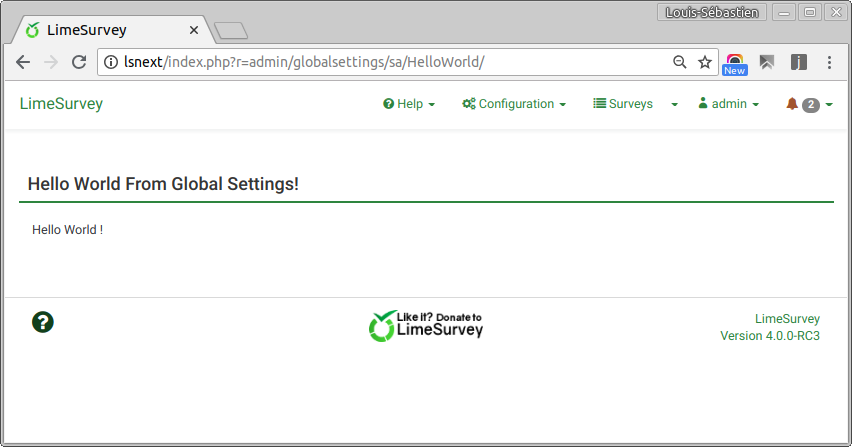
We added a very simple HelloWorld method that will display the content of the HelloWorld view.
You can reach it via: index.php?r=admin/globalsettings/sa/HelloWorld/
notice the backslash in front of the second GlobalSettings: it means that we extend the GlobalSetting class from the global namespace, so from core.
Indeed, Yii1 core classes, like LimeSurvey core classes, are under the global PHP name space: **/**. Since our module use a namespace. As a consequence, we'll have to use the global name space in front of all the calls to Yii or LS classes. Eg:
```php
\Yii::getPathOfAlias();
```
instead of:
```php
Yii::getPathOfAlias();
```
## Adding new method to the GlobalSettings controller
Now, any method you'll add to your module will be accessible as if it was part of the core controller.
We added a very simple HelloWorld method that will display the content of the HelloWorld view.
You can reach it via: **index.php?r=admin/globalsettings/sa/HelloWorld/**
As you can see, it's using its own view, so it's rendered in its own page like if it was a separated module. It's still availabe via the globalsettings route. So it could be a page displayed by clicking on a button or a menu in global setting, it could be an adavanced editing page for some kind of new settings, etc.
## Extending a method from the GlobalSettings controller
Of course, most of the time, when you extend a class, what you want is to override one of its methode to add some specific logic to it. Here, we did a very simple exemple.
### New class parameter
First, we added a new parameter to the GlobalSetting class:
```php
// Just an example to show how to override a parent method
public $myNewParam = "This was not in global setting core controller";
```
https://github.com/LimeSurvey/LimeSurvey/blob/98df1afb094077995e2e3b4426a4b64d06d20d60/modules/admin/globalsettings/controller/globalsettings.php#L31
### Override \GlobalSetting::_renderWrappedTemplate()
We want to display this new param inside the overview pan of global settings. So first, we need to add $myNewParam to the array of data passed to the views.
So, first, we override the \GlobalSetting::_renderWrappedTemplate() :
```php
protected function _renderWrappedTemplate($sAction = '', $aViewUrls = array(), $aData = array(), $sRenderFile = false)
{
// We add ou new paramater to the data to parse to the view
$aData["myNewParam"] = $this->myNewParam;
// Then we just call the parent method
parent::_renderWrappedTemplate($sAction, $aViewUrls, $aData, $sRenderFile);
}
```
https://github.com/LimeSurvey/LimeSurvey/blob/98df1afb094077995e2e3b4426a4b64d06d20d60/modules/admin/globalsettings/controller/globalsettings.php#L50-L64
As you can see, we do only one thing: we add $myNewParam to $aData, then we just call the parent method. This is a very normal way of processing. Then what ever change we do to the core method will also apply to your extension. For exemple, that what we're doing when we override the renderPartial method:
https://github.com/LimeSurvey/LimeSurvey/blob/98df1afb094077995e2e3b4426a4b64d06d20d60/application/controllers/AdminController.php#L200-L221
Of course, you can also completly rewrite the logic of the parent method, and not calling at all the parent method. Sometime: you just don't have the choice. Especially when the code is not that much functional oriented, and when the method signature is poor (and let be honnest, it is often the case in LimeSurvey code). For exemple we could also have override the method \GlobalSetting::_displaySettings(). But it accepts no parameter at all, so we would have been forced to rewrite it locally:
https://github.com/LimeSurvey/LimeSurvey/blob/98df1afb094077995e2e3b4426a4b64d06d20d60/application/controllers/admin/globalsettings.php#L68-L110
But good news: LimeSurvey is OpenSource. So if you feel blocked because the signature of a core method is too poor to be called as a parent method, just modify the signature, and submit a PR. Then, step by step, all the core code will become much more functionnal and easy to override from modules.
### Override the views
We made admin views override very simple for module. You just have to copy paste the views in your local module. If you have a look to the folders **/modules/admin/globalsettings/views** , you can see it contains 3 files:
```
[HelloWorld.php]
[_overview.php]
[globalSettings_view.php]
```
https://github.com/LimeSurvey/LimeSurvey/tree/98df1afb094077995e2e3b4426a4b64d06d20d60/modules/admin/globalsettings/views
**_overview.php** and **globalSettings_view.php** has been copy/paste from core views:
https://github.com/LimeSurvey/LimeSurvey/tree/98df1afb094077995e2e3b4426a4b64d06d20d60/application/views/admin/globalsettings
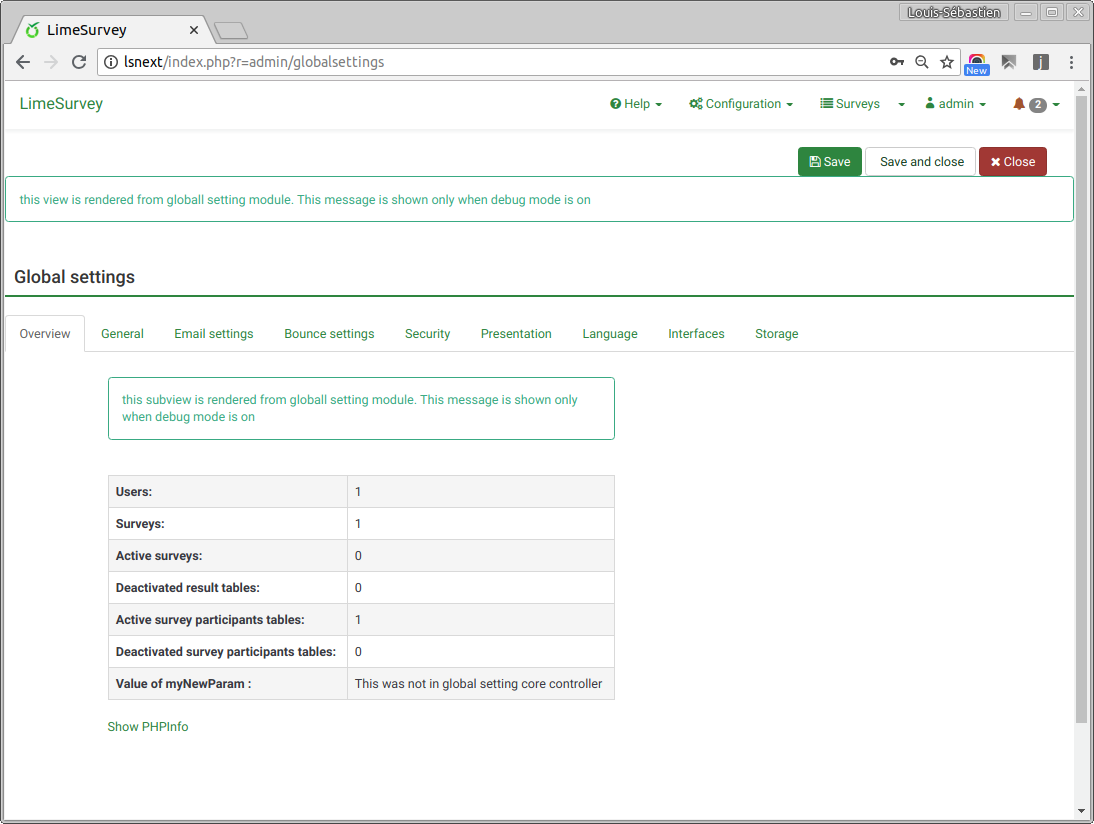
Now, the views from the module are the one rendered, not the views from the core. To make it clear, we added an alert in the module views.
In globalSettings_view.php:
```php
<?php if(YII_DEBUG ): ?>
<p class="alert alert-info "> This view is rendered from the global settings module. This message is shown only when debug mode is on. </p>
<?php endif;?>
```
https://github.com/LimeSurvey/LimeSurvey/blob/98df1afb094077995e2e3b4426a4b64d06d20d60/modules/admin/globalsettings/views/globalSettings_view.php#L15-L17
In _overview.php :
```php
<?php if(YII_DEBUG ): ?>
<p class="alert alert-info "> This subview is rendered from global settings module. This message is shown only when debug mode is on. </p>
<?php endif;?>
```
https://github.com/LimeSurvey/LimeSurvey/blob/98df1afb094077995e2e3b4426a4b64d06d20d60/modules/admin/globalsettings/views/_overview.php#L15-L17
If debug mode is on, it will show you an alert that tells you those views are the one from the module.
Then, in globalSettings_view.phop, we add the parameter $myNewParam to the data passed to the view _overview.php
```php
$this->renderPartial("./globalsettings/_overview", array(
'usercount'=>$usercount,
'surveycount'=>$surveycount,
'activesurveycount'=>$activesurveycount,
'deactivatedsurveys'=>$deactivatedsurveys,
'activetokens'=>$activetokens,
'deactivatedtokens'=>$deactivatedtokens,
// Here, we pass to the subview the new parameter
'myNewParam'=>$myNewParam,
)
```
https://github.com/LimeSurvey/LimeSurvey/blob/98df1afb094077995e2e3b4426a4b64d06d20d60/modules/admin/globalsettings/views/globalSettings_view.php#L40-L51
That's a bit annoying. Would be better if all the data was passed to the subviews, so we would avoid to force third party coder to override the main views. Again: if you face this situtation, you can make a PR, so step by step LimeSurvey become more modular.
Now, in _overview.php, we show that data:
```php
<?php if(YII_DEBUG ): ?>
<!-- If debug mode is on, we show the new parameter -->
<tr>
<th >Value of myNewParam :</th><td><?php echo $myNewParam; ?></td>
</tr>
<?php endif;?>
```
https://github.com/LimeSurvey/LimeSurvey/blob/98df1afb094077995e2e3b4426a4b64d06d20d60/modules/admin/globalsettings/views/_overview.php#L39-L44
Now, if debug mode is on, you should see:
## Conclusion
That was a very brief introduction. Of course, you can do much more complex things. In global settings, you could add new settings for one of your modules (like the HelloWorld module). You would then need to override the _saveSettings method. Now, you can modify LimeSurvey deeply wihtout waiting for the team to add new events, or without modifying the core files.